Lucida for the MCAT
Lucida is a free flashcard app for MCAT content review: it turns your notes into cards (or your own AI does), FSRS schedules the reviews, and Pro can set your test date so cards you’d forget by then come up early. Flashcards cover recall, not the whole exam: the AAMC says learning through practice is key and that CARS needs no specific content knowledge, so pair your cards with practice questions and full-length exams.
On this page
At a glance
| MCAT section (AAMC) | Questions | Time | Content knowledge? |
|---|---|---|---|
| Chemical and Physical Foundations of Biological Systems | 59 | 95 minutes | Yes: science content |
| Critical Analysis and Reasoning Skills (CARS) | 53 | 90 minutes | No specific content knowledge needed |
| Biological and Biochemical Foundations of Living Systems | 59 | 95 minutes | Yes: science content |
| Psychological, Social, and Biological Foundations of Behavior | 59 | 95 minutes | Yes: science content |
| Total | 230 | 6 hours 15 minutes of content time (about 7 hours 30 minutes seated) |
What flashcards can do for the MCAT
Three of the four sections, 177 of the 230 questions, test science and behavioral science content. The AAMC says the content draws on year-long courses in general chemistry, organic chemistry, introductory physics and introductory biology, and on introductory courses in biochemistry, psychology and sociology. Flashcards are good at keeping definitions, pathways, equations and terms ready to recall.
The AAMC also says learning through practice is key, and offers official prep written by the test developers. Passages and practice exams train the reasoning that cards can’t. Use cards for recall and practice for application. Each section is scored 118 to 132, for a total of 472 to 528.
The studies we read on flashcards and exam scores are about medical-school exams, not the MCAT (see Lucida for medical school).
Set up your content review, step by step
- 1. Understand first. Piotr Wozniak’s first rule of formulating knowledge is not to learn what you don’t understand. Cards are for holding what you’ve already understood, so read or watch a topic, then make its cards.
- 2. One deck per subject. Use tags for topics, like Kinematics or Amino acids. Tags give you Learn mode sets and, on Pro, weak-topic stats.
- 3. Make the cards. Use Make cards in Lucida with your notes, slides or a PDF, or share your notes with your own AI and ask for one fact per card, blanks for definitions, and picture cards for diagrams. Then read them (see AI flashcards).
- 4. Learn, then review. Use Learn mode to drill a new set, then review a little each day.
- 5. Set your test date (Pro). From 30 days out, the cards you’d likely forget by test day come up early.
- 6. Mix in practice. Work passages and questions alongside your cards, and check the AAMC’s official prep.
Amino acids, equations and other awkward cards
- 20 new cards a day to start
- No daily review limit
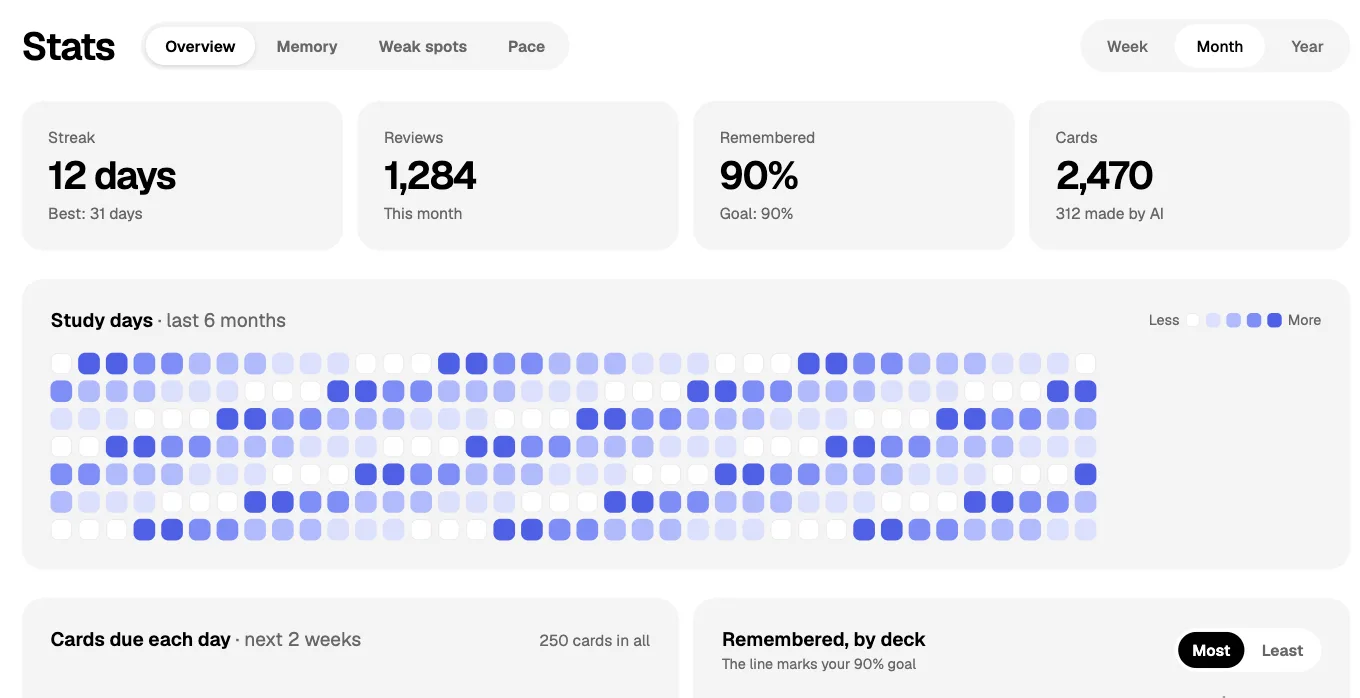
- Stats (Pro) shows the cards due each day this week
| Card | What to do |
|---|---|
| Structures and diagrams | Use a picture card or image occlusion: hide the name, or hide parts of the picture. |
| Equations | Lucida shows simple math: powers, subscripts, fractions, square roots and Greek letters. Write $F = ma$ or $\frac{a}{b}$. It doesn’t do full equation layout. |
| Lists | Turn a long list into one blank or one card per item. Wozniak advises avoiding sets and enumerations. |
| Formulas | Keep each card to one formula and what its symbols mean. |
Ready-made decks
Lucida has no official MCAT deck. You can search Discover by topic, and decks there are made by people, so check them. AnkiHub lists an MCAT deck for Anki that syncs through AnkiHub. Lucida can’t use decks like that directly, because it can’t open .apkg files or connect to AnkiHub.
Your daily load
Lucida starts at 20 new cards a day, which you can change in Settings or for each deck. There’s no daily review limit, so the Stats page, which shows how many cards are due each day this week, helps you pick a pace. Anki’s manual warns that adding new cards while you’re behind can make a backlog worse, so don’t add cards faster than you can review them.
What Lucida doesn’t do
- It has no MCAT content or practice questions, and it isn’t affiliated with the AAMC.
- It can’t open .apkg files, and text imports drop pictures, sounds, tags and review history (see importing).
- Math is basic, and it needs an internet connection.
- AI-made cards can be wrong, so read them before you study.
Test yourself
Show the answerShow the questionWhich plan lets you set a test date, and what does it do?Pro. From 30 days out, the cards you’d likely forget by test day come up early.
Show the answerShow the questionWhat do flashcards cover for the MCAT?Recall, not the whole exam. Use cards for recall and practice for application.
Show the answerShow the questionIs the research on flashcards and exam scores about the MCAT?No. The studies we read on flashcards and exam scores are about medical-school exams, not the MCAT.
Show the answerShow the questionDoes Lucida include MCAT content or practice questions?No. It has no MCAT content or practice questions, and it isn’t affiliated with the AAMC.
Questions
Is Anki necessary for the MCAT?
No. The MCAT doesn’t test which tools you used, and the AAMC’s own advice is that learning through practice is key. Flashcards, in Lucida or Anki, are one way to keep content ready to recall.
What are the best MCAT flashcards?
There’s no single best deck. A good one is made or edited by you from sources you trust, with one fact per card. Lucida can draft cards from your notes, or your own AI can, and you read them before you study. No deck replaces practice questions.
How many flashcards should I do a day for the MCAT?
There’s no official number. Start at Lucida’s default of 20 new cards a day and raise it only while your daily reviews stay doable. Each new card adds reviews later.
When should I start MCAT flashcards?
After you’ve understood a topic, not before. Cards help you remember, not learn something for the first time, so make a topic’s cards as you finish learning it.
Can I make MCAT flashcards with ChatGPT or Claude?
Yes. Connect your AI app to Lucida, share your notes and ask for cards. Give it your source material, read the cards, and use Let me check AI cards first if you like. See AI flashcards.
Can Lucida make MCAT flashcards from my notes itself?
Yes. Choose Make cards and add your notes: a PDF, slides, a Word file, captions, pictures or pasted text. Lucida shows the new cards first, so you read them before you keep them. Free allows 3 makes a day.
Do flashcards help with CARS?
Not directly. The AAMC says the Critical Analysis and Reasoning Skills section requires no specific content knowledge. Passages and timed practice are what train it.
Can I set my MCAT test date in Lucida?
Yes, on Pro. Add an exam date to a deck, and from 30 days before, cards you’d probably forget by then come up early. See spaced repetition.
Does Lucida have MCAT decks?
There’s no official one. You can search Discover for decks other people shared, and check them before you trust them.
Is Lucida free for MCAT studying?
Yes. Unlimited decks and cards, FSRS, Learn mode, image occlusion and sharing are free. Pro is $5.99 a month or $49.99 a year (as of September 2026).
Can I import my Anki or Quizlet MCAT cards?
Yes, through text exports, but not .apkg files. Pictures, sounds, tags and review history don’t come along. See importing.
Keep reading
Sources (7)
The pages this one was written from, and the day each was checked.
- AAMC: What’s on the MCAT exam? · checked September 30, 2026
- AAMC: The MCAT exam score scale · checked September 30, 2026
- AAMC: Prepare for the MCAT exam · checked September 30, 2026
- Wozniak (1999), Twenty rules of formulating knowledge, SuperMemo · checked September 30, 2026
- Anki Manual: Deck options · checked September 30, 2026
- AnkiHub: AnKing Step Deck · checked September 30, 2026
- Lucida pricing (what Free and Pro include, as of September 2026) · checked October 1, 2026