Lucida vs Knowt
Knowt has AI built in (note summarizers, a tutor, exam prep), but its free plan limits the AI and shows ads. Lucida has no ads, makes cards from your files itself and lets your own AI (Claude, ChatGPT) make them too, so pick Knowt for one-stop AI and a big library, and Lucida for FSRS reviews, export and free live games.
On this page
At a glance
| Feature | Lucida | Knowt |
|---|---|---|
| Price (September 2026) | Free: unlimited decks and cards, spaced repetition, Learn mode, sharing, live games, import and export. Pro: $5.99 a month or $49.99 a year. | Free: unlimited sets and notes and every study mode on your own sets, with ads. Ultra: $149.99 a year (3-day free trial) or $24.99 a month. |
| Platforms | Web app at app.lucida.cards, on computers and phones. No App Store app yet. | Website, iPhone (App Store) and Android (Google Play). |
| Spaced repetition | FSRS plans every review. Grade each card Forgot, Hard, Good or Easy, and set how much you want to remember. Pro adds exam dates and tuning to your own reviews. | Spaced Repetition mode: rate each card Again, Hard, Good or Easy, and choose new cards a day and the intervals. It doesn’t name its algorithm. |
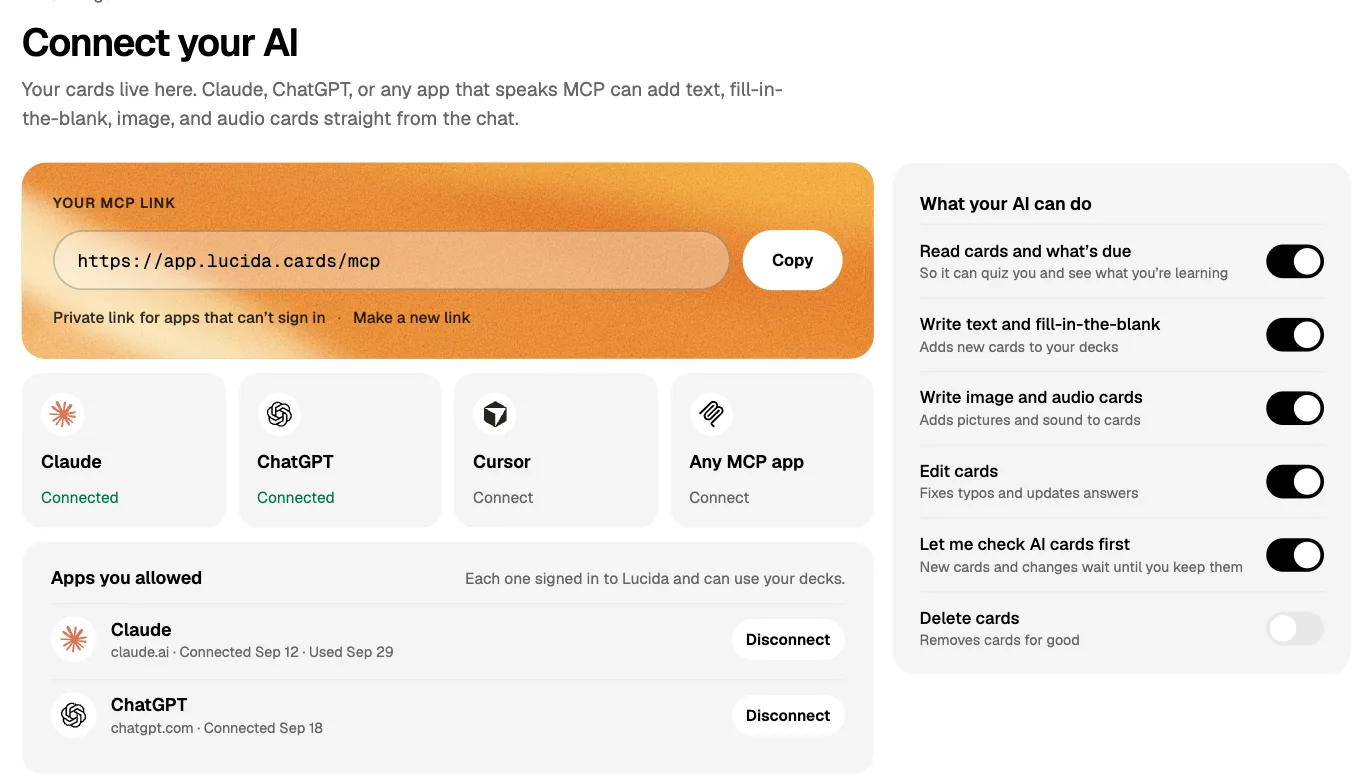
| AI | Built in: makes cards, writes live-game questions from a topic and explains answers. Your own AI (Claude, ChatGPT, Cursor or any MCP app) can also make and edit cards and Learn quizzes through your personal Lucida link. You choose what it may do and can check its cards first. | Built in: a Kai chat in the editor, summarizers for PDFs, video, images and slides, a live-lecture note taker, AI podcasts and a voice tutor. The free plan allows 1 summary a month. |
| Making cards | Type cards in the editor (bold, italics, math, lists), import a list, make cards from a PDF, slides, a Word file, caption files, pictures, a recording, a YouTube video or a topic (3 makes a day on Free, 30 on Pro), or ask your own AI. Lucida shows new cards first, and you keep, edit or remove each one. | Type terms, paste a list, import, or make cards from PDFs, video, audio or a live recording with AI. |
| Card kinds | Question and answer, fill in the blank (cloze), picture with hidden parts (image occlusion), and sound. | Term and definition cards, each with an optional image or recorded audio clip, multiple-choice options and hints. |
| Import and export | Import pasted text or a .csv, .tsv or .txt file, including Anki’s Notes in Plain Text export and Quizlet’s export. Not .apkg files. Export a CSV for each deck, or everything (decks, cards, reviews) as JSON. | Import by pasting text (for Anki and CSV, through a spreadsheet), from Google Drive, or from Quizlet with Knowt’s Chrome extension. Export as PDF. |
| Sharing | Decks are private, link-only or public. Profiles, Discover, study a deck as it is or copy it, suggest changes, version history. All free. | Millions of public sets, notes and exam resources (its plans page says 5 million). Share sets and collaborate live. |
| Games | Live: play a deck with up to 60 friends on their phones. They join with a code or QR, no account. Free. | Knowt Play: a live game for students. Players join at knowt.com/join with a 6-digit code, no sign-in needed. Five modes: Classic, Race, Clash, Blitz and Survival. |
| Works offline | No. Lucida needs an internet connection. | Not confirmed. Its help center has no article on offline use. |
| Privacy | No ads. We don’t sell your data or use your cards to train AI models (privacy policy). You need an account, and data is stored in the United States. Export or delete it from Settings. | The free plan shows ads. Its privacy policy (updated March 18, 2026) says advertising and analytics partners use cookies and device IDs. |
Show all 11Show fewer
The short version
Knowt is a flashcard and notes app with AI built in. You upload a PDF, video or lecture, and it writes notes and cards for you. The free plan covers every study mode on your own sets, and limits the AI.
Lucida makes cards from your files too: choose Make cards, and Lucida writes them and shows them to you first. Your own AI app can also make cards through your Lucida link, and Lucida puts no limit on how many cards your AI app makes on Free. Lucida also has no ads.
Where Knowt is better
- More AI tools built in. Summarizers for PDFs, video, images and slides, a live-lecture note taker, AI podcasts and a voice tutor, all without a separate AI subscription. Lucida’s own AI makes cards, starts live games from a topic and explains answers.
- Phone apps for iPhone and Android, plus a Chrome extension for bringing in PDFs, YouTube videos and Quizlet sets.
- Exam prep. Full access to AP, SAT and ACT prep is part of Ultra, and the free plan includes one full-length mock exam.
- Knowt Play. Five live game modes (Classic, Race, Clash, Blitz and Survival) with short-answer questions as well as multiple choice.
- Notes and cards together, and a library of millions of public sets and notes.
- Teacher tools. Teachers assign sets, turn a set into a live game, and see each student’s time in every study mode and mastery per card. Lucida has no assignments or per-student reports.
Where Lucida is better
- No ads, free or Pro. Knowt’s Ultra plan is what removes its ads.
- Free card-making. Lucida’s own card maker allows 3 makes a day on Free, up to 100 cards each. Your own AI app has its own limits, but on Free, Lucida lets your AI make as many cards as you want. Knowt’s free plan allows 1 AI summary a month.
- FSRS reviews with a goal you set, and exam dates on Pro. Knowt names no algorithm for its spaced repetition mode.
- Cloze and picture-hiding cards. Lucida has fill-in-the-blank cards and pictures with hidden parts, free (up to 100 pictures and sounds). Knowt’s help center doesn’t describe either kind.
- Your data out. Export a deck as CSV, or everything including reviews as JSON. Knowt exports flashcards as PDF.
- Live games need no setup: any deck or a topic you type, up to 60 players, and your AI can write the questions for your cards.
Moving between them
To Lucida from Knowt: Knowt exports flashcards as a PDF, so copy the terms and definitions out as text (one card per line, with a tab or comma between the sides) and paste them into Lucida’s Import cards.
To Knowt from Lucida: export a deck as CSV, open it in a spreadsheet, and paste it into Knowt’s Import manually box. Knowt’s help says Anki and CSV decks go in this way.
- 1Export from KnowtKnowt exports flashcards as a PDF
- 2Copy the terms and definitionsOne card per line
- 3Paste into Import cardsIn Lucida
Who should pick which
- KnowtPick Knowt if you want more AI built in, phone apps, AP, SAT or ACT prep, or a live game with several modes.
- LucidaPick Lucida if you want no ads, FSRS reviews, easy export, and cards made from your files or by your own AI.
How we checked this page
Facts about Knowt come from Knowt’s plans page, help center, privacy policy and home page, opened on September 30, 2026. Facts about Lucida come from the app, its pricing page and its privacy policy, and are as of October 1, 2026. Where we couldn’t confirm something about Knowt, we left it out. If anything here is wrong, write to team@lucida.cards.
Test yourself
Show the answerShow the questionDoes Knowt’s free plan show ads?Yes. Knowt’s Ultra plan removes them, and Lucida shows no ads, free or Pro.
Show the answerShow the questionWhat does Knowt Ultra cost?$149.99 a year with a 3-day free trial, or $24.99 a month.
Show the answerShow the questionHow many AI summaries does Knowt’s free plan allow?1 summary a month. On Free, Lucida lets your own AI make as many cards as you want.
Show the answerShow the questionWhat AI tools does Knowt have built in?Summarizers for PDFs, video, images and slides, a live-lecture note taker, AI podcasts and a voice tutor.
Questions
Is Knowt free?
Mostly. The free plan has unlimited flashcard sets and notes, every study mode on your own sets (Learn, Practice Test, Spaced Repetition, Match and Flashcards) and live collaboration. AI is limited: 1 summary a month, 1 free mock exam and 5 practice-room sessions. The free plan shows ads.
How much does Knowt Ultra cost?
Knowt Ultra is $149.99 a year or $24.99 a month (knowt.com/plans, September 2026). The yearly plan has a 3-day free trial. Ultra removes ads and adds unlimited AI summaries, a voice tutor and full AP, SAT and ACT prep.
Does Knowt have spaced repetition?
Yes. Spaced Repetition mode asks you to rate each card Again, Hard, Good or Easy and lets you set new cards a day and the intervals. Knowt doesn’t say which algorithm it uses. Lucida plans reviews with FSRS.
Does Knowt have ads?
On the free plan, yes. Knowt lists an ad-free experience as part of Ultra, and its privacy policy says advertising and analytics partners use cookies and device IDs. Lucida shows no ads.
Can I import Anki or Quizlet decks into Knowt?
Yes, by pasting text. For Anki and CSV files, Knowt’s help says to put the terms and definitions in a spreadsheet and paste them into Import manually. For Quizlet it offers a Chrome extension, and its help notes that Quizlet sometimes blocks it. Lucida reads Anki’s Notes in Plain Text export and Quizlet’s export directly.
Is Lucida a good Knowt alternative?
If you want no ads, FSRS reviews, easy export, and cards made from your files or by your own AI, yes. If you want more AI built into the app, phone apps or AP, SAT and ACT prep, Knowt fits better.
Does Knowt have live games like Kahoot?
Yes. Knowt Play turns flashcards, notes or assessments into a live game for students. Students join at knowt.com/join with a 6-digit code. Lucida’s Live is similar for flashcards: up to 60 friends join on their phones with a code, free.
Does Knowt work offline?
We couldn’t confirm it. Knowt’s help center has no article on offline use. Lucida has no offline mode.
Keep reading
Sources (16)
The pages this one was written from, and the day each was checked.
- Knowt plans and pricing · checked September 30, 2026
- Knowt home page · checked September 30, 2026
- Knowt Help Center: What’s included in the free plan for students? · checked September 30, 2026
- Knowt Help Center: How do I use Spaced Repetition mode? · checked September 30, 2026
- Knowt Help Center: How can I use AI to make my flashcards? · checked September 30, 2026
- Knowt Help Center: How do I create and edit flashcards? · checked September 30, 2026
- Knowt Help Center: How can I import flashcards from things like Anki and CSV files? · checked September 30, 2026
- Knowt Help Center: How can I export my flashcards? · checked September 30, 2026
- Knowt Help Center: How to import flashcards from Quizlet to Knowt · checked September 30, 2026
- Knowt Help Center: Getting Started with Knowt Play · checked September 30, 2026
- Knowt Help Center: Knowt Play game modes and settings · checked September 30, 2026
- Knowt Help Center: Knowt Play, additional details · checked September 30, 2026
- Knowt Help Center: How to see which students completed a study mode · checked September 30, 2026
- Knowt privacy policy · checked September 30, 2026
- Lucida pricing · checked October 1, 2026
- Lucida privacy policy · checked October 1, 2026