Lucida vs Anki
Anki is the better choice if you want full control, add-ons and offline study on your own devices, and it is free on computers and Android. Lucida is the easier choice if you want FSRS reviews in any browser, with Lucida making cards from your files and your own AI (Claude, ChatGPT) able to make and edit them too.
On this page
At a glance
| Feature | Lucida | Anki |
|---|---|---|
| Price (September 2026) | Free: unlimited decks and cards, spaced repetition, Learn mode, sharing, live games, import and export. Pro: $5.99 a month or $49.99 a year. | Free on Windows, Mac and Linux, and on Android (AnkiDroid). The iPhone and iPad app, AnkiMobile, is $24.99, paid once. AnkiWeb sync is free. |
| Platforms | Web app at app.lucida.cards, on computers and phones. No App Store app yet. | Windows 10+, macOS 13+, Linux, iPhone and iPad, Android. AnkiWeb works in a browser for reviewing and basic text cards. |
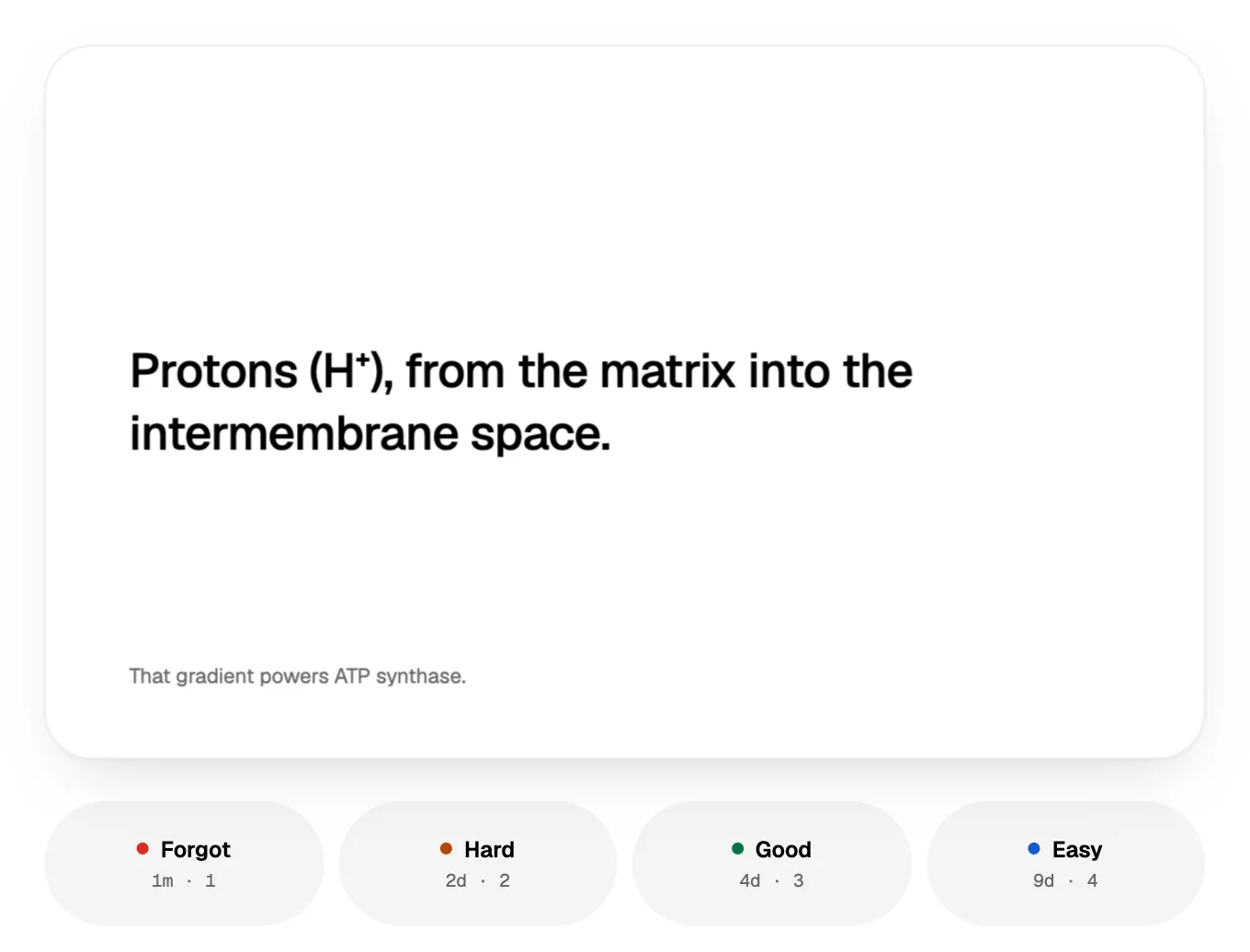
| Spaced repetition | FSRS plans every review. Grade each card Forgot, Hard, Good or Easy, and set how much you want to remember. Pro adds exam dates and tuning to your own reviews. | SM-2, or FSRS if you switch it on. Four answer buttons: Again, Hard, Good, Easy. Many deck options, including learning steps and rules for cards you keep forgetting. |
| AI | Built in: makes cards, writes live-game questions from a topic and explains answers. Your own AI (Claude, ChatGPT, Cursor or any MCP app) can also make and edit cards and Learn quizzes through your personal Lucida link. You choose what it may do and can check its cards first. | Not built in. Add-ons can connect it to Claude, ChatGPT, Gemini or DeepSeek with your own API key. |
| Making cards | Type cards in the editor (bold, italics, math, lists), import a list, make cards from a PDF, slides, a Word file, caption files, pictures, a recording, a YouTube video or a topic (3 makes a day on Free, 30 on Pro), or ask your own AI. Lucida shows new cards first, and you keep, edit or remove each one. | You add notes, and a note type (fields plus HTML and CSS templates) makes the cards. Very flexible, with more to learn. |
| Card kinds | Question and answer, fill in the blank (cloze), picture with hidden parts (image occlusion), and sound. | Basic, basic and reversed, optional reversed, type-in answer, cloze, and image occlusion (built in since 23.10). Pictures, audio, video and math on any card. |
| Import and export | Import pasted text or a .csv, .tsv or .txt file, including Anki’s Notes in Plain Text export and Quizlet’s export. Not .apkg files. Export a CSV for each deck, or everything (decks, cards, reviews) as JSON. | Imports text files, packaged decks (.apkg, .colpkg) and Mnemosyne files. Exports notes as plain text, decks as .apkg and your whole collection as .colpkg. |
| Sharing | Decks are private, link-only or public. Profiles, Discover, study a deck as it is or copy it, suggest changes, version history. All free. | AnkiWeb has a library of shared decks that you download and import as files. Add-ons extend Anki further. |
| Games | Live: play a deck with up to 60 friends on their phones. They join with a code or QR, no account. Free. | Not built in. |
| Works offline | No. Lucida needs an internet connection. | Yes. Your collection lives on your device, and syncing is optional. |
| Privacy | No ads. We don’t sell your data or use your cards to train AI models (privacy policy). You need an account, and data is stored in the United States. Export or delete it from Settings. | Local-first. AnkiMobile says nothing you store in it is shared by default. AnkiWeb may delete data from accounts unused for 6 months. Open source. |
Show all 11Show fewer
The short version
Anki is powerful and free on computers and Android, with a huge community. It is local-first: your cards sit on your device, and you choose how much to configure.
Lucida has fewer settings and nothing to install. You sign in, make cards from your files, ask your own AI for cards or type them, and Lucida plans every review with FSRS. Learn mode and live games come with it.
Where Anki is better
- Cost on computers and Android. Anki is free and open source on computers, and AnkiDroid is free on Android.
- It works offline. Your collection lives on your device and syncs when you choose. Lucida needs an internet connection.
- Add-ons. Wikipedia counts more than 1,600, for things like speech, statistics and image occlusion. Lucida has no add-ons.
- Card templates you fully control, built from fields plus HTML and CSS. Lucida has four card kinds and a fixed card layout, and Pro adds themes.
- A deeper scheduler. Anki’s 26.09 release updated its FSRS to 6.6.2, and its deck options cover steps, limits and cards you keep forgetting. Lucida uses FSRS 5, and tuning it to your own reviews is a Pro feature.
- Big collections. Anki’s site says it handles decks of 100,000+ cards with no problems.
- A long track record. Wikipedia dates Anki’s first release to October 5, 2006, and Anki’s site lists version 26.09.3 as current. Lucida is new.
Where Lucida is better
- Nothing to install or set up. Open a browser on any computer or phone. Anki’s iPhone app costs $24.99, and Lucida works in Safari for free.
- AI that makes and works on your cards. Lucida makes cards from a PDF, slides, a Word file, caption files, pictures, a recording, a YouTube video or a topic, and shows them to you before they are saved. Your own AI (Claude, ChatGPT, Cursor or any MCP app) can also add cards, fix them, write quiz questions and see what is due: it connects through one link and a sign-in to Lucida. You choose what it may do and can check its cards before they join a deck. In Anki this takes an add-on and your own API key.
- Learn mode is built in and free: multiple choice, true or false, fill in the blank, matching and typing questions made from your cards.
- Live games. Play any deck with up to 60 friends on their phones. Anki has no games built in.
- Sharing. Send a deck by link or make it public, suggest changes to someone else’s deck and go back to any version.
- Sync is just signing in. Your cards are on every device you sign in to.
Bring your Anki decks to Lucida
In Anki, choose File, then Export, then Notes in Plain Text. In Lucida, open Import cards, choose the file and pick a deck.
Lucida reads Anki’s tab-separated text, its deck column (so each subdeck becomes its own deck), bold and italics, and {{c1::cloze}} blanks, which become fill-in-the-blank cards.
Pictures, sounds, tags and your review history don’t come across, and Lucida can’t read .apkg files. Every card starts as new.
- 1Export in AnkiFile, then Export
- 2Choose Notes in Plain Text
- 3Open Import cardsIn Lucida
- 4Choose the fileAnd pick a deck
Can you use both?
Yes. Keep Anki for big, heavily customized decks and offline study, and use Lucida for cards made from your files or by your AI, Learn mode and live games. Export a Lucida deck as CSV and Anki can import it, because Anki reads text and CSV files.
Who should pick which
- AnkiPick Anki if you want total control, add-ons, offline study, or you already have a large collection.
- LucidaPick Lucida if you want to start in a minute, make cards from your files or with your own AI, and study on a phone without installing anything.
How we checked this page
Facts about Anki come from apps.ankiweb.net, the Anki manual, AnkiWeb, the AnkiMobile App Store listing and Anki’s GitHub release notes (the add-on count comes from Wikipedia, used to fill a gap), opened on September 30, 2026. Facts about Lucida come from the app, its pricing page and its privacy policy, and are as of October 1, 2026. Where we couldn’t confirm something about Anki, we left it out. If anything here is wrong, write to team@lucida.cards.
Test yourself
Show the answerShow the questionIs Anki free?Mostly. It is free on Windows, Mac, Linux and Android, but AnkiMobile, the iPhone and iPad app, costs $24.99, paid once.
Show the answerShow the questionWhich app works offline, Anki or Lucida?Anki does: your collection lives on your device. Lucida needs an internet connection.
Show the answerShow the questionWhat does Anki need to connect to Claude or ChatGPT?An add-on and your own API key. In Lucida, your own AI connects through one link and a sign-in.
Show the answerShow the questionCan Lucida read Anki’s .apkg deck files?No. Export Notes in Plain Text from Anki instead, but pictures, sounds, tags and your review history don’t come across.
Questions
Is Anki free?
Mostly. Anki on Windows, Mac and Linux is free, AnkiDroid on Android is free, and AnkiWeb sync is free. The iPhone and iPad app, AnkiMobile, costs $24.99 once (App Store, September 2026).
Why does Anki cost money on iPhone?
AnkiMobile’s App Store listing says sales of the app support the development of both the computer and mobile versions, which is why it is priced like a computer application.
Is Lucida better than Anki?
Neither is better for everyone. Anki wins on control, add-ons, offline use and a free computer app. Lucida wins on getting started fast, cards made from your files or by your own AI, and built-in Learn mode and live games. You can try Lucida on one deck for free and keep Anki for anything that needs offline study or add-ons.
Does Lucida use FSRS like Anki?
Yes. Both use FSRS, the Free Spaced Repetition Scheduler. Anki lets you choose FSRS or its older SM-2 and ships a newer FSRS version. Lucida plans reviews with FSRS by default and asks you to grade each card Forgot, Hard, Good or Easy.
Can I import my Anki deck into Lucida?
Yes, as text. Export the deck from Anki with File, Export, Notes in Plain Text, then use Import in Lucida. Cards, bold and italics, cloze blanks and deck names come across. Pictures, sounds, tags, review history and .apkg files don’t.
Does Anki have AI?
Not built in. Add-ons can connect it to AI models. One on AnkiWeb supports Claude, ChatGPT, Gemini and DeepSeek with your own API key and adds information to cards you select (updated February 26, 2026). Lucida has its own AI for making cards from your files, and your own AI app can also make and edit cards through your Lucida link.
Does Lucida work offline like Anki?
No. Lucida is a web app and needs an internet connection. Anki keeps your collection on your device and syncs when you choose.
Does Anki work in a browser?
Partly. AnkiWeb is a free companion for reviewing online, and it can make basic text-only cards. Anki’s own site says you need the free computer app for shared decks and multimedia. Lucida works fully in the browser.
Can I use Lucida and Anki together?
Yes. Use Anki for deep, offline study and Lucida for cards made from your files or by your AI. Export a Lucida deck as CSV to bring it into Anki, or export Anki’s Notes in Plain Text to bring a deck into Lucida.
Keep reading
Sources (18)
The pages this one was written from, and the day each was checked.
- Anki: downloads, platforms and features · checked September 30, 2026
- AnkiMobile on the App Store (price, privacy note) · checked September 30, 2026
- Anki manual: Deck options (FSRS and SM-2) · checked September 30, 2026
- Anki manual: Getting started (note types) · checked September 30, 2026
- Anki manual: Adding and editing (cloze, image occlusion) · checked September 30, 2026
- Anki manual: Card templates (HTML and CSS) · checked September 30, 2026
- Anki manual: Add-ons · checked September 30, 2026
- Anki manual: Syncing with AnkiWeb · checked September 30, 2026
- Anki manual: Importing · checked September 30, 2026
- Anki manual: Exporting · checked September 30, 2026
- AnkiWeb: About · checked September 30, 2026
- AnkiWeb: Shared decks · checked September 30, 2026
- AnkiMobile manual: Introduction (privacy) · checked September 30, 2026
- Anki 26.09 release notes on GitHub · checked September 30, 2026
- Anki AI add-on on AnkiWeb · checked September 30, 2026
- Wikipedia: Anki (add-on count, used to fill a gap) · checked September 30, 2026
- Lucida pricing · checked October 1, 2026
- Lucida privacy policy · checked October 1, 2026