The best Anki alternatives
The right Anki alternative depends on what you want to change: Lucida for FSRS in a browser with cards made from your files or by your own AI, RemNote or Mochi for notes, apps and offline study, and Knowt or Brainscape for a quick start with AI built in. If Anki already works for you, keep it: it is free on computers and Android and has more than 1,600 add-ons.
On this page
At a glance
| Feature | Anki | Lucida | RemNote | Mochi | Knowt | Brainscape |
|---|---|---|---|---|---|---|
| Price (September 2026) | Free. iPhone app $24.99. | Free. Pro $5.99 a month. | Free. Pro $8 a month billed yearly. | Free. Pro $5 a month billed yearly. | Free. Ultra $24.99 a month. | Free. Pro from $7.99 a month (yearly). |
| Platforms | Windows, Mac, Linux, iPhone, Android | Web, on computers and phones | Web, desktop, iPhone, Android | Mac, Windows, Linux, iPhone, Android, web | Web, iPhone, Android | Web, iPhone, Android |
| Spaced repetition | SM-2 or FSRS | FSRS | SM-2, or FSRS 6 (beta) | Own algorithm, or FSRS | Again, Hard, Good, Easy mode | Own 1 to 5 confidence system |
| AI | Add-ons only | Built in for making cards, plus your own AI through MCP | Built in, monthly credits | Built in (Pro), monthly limits | Built in, limited on Free | Built in, limited on Free |
| Making cards | Notes and note types (HTML and CSS) | Editor, import, files, or your AI | Any bullet in your notes | Markdown, with --- between sides | Type, paste, or AI from files | Type, paste or upload, or AI |
| Card kinds | Basic, reversed, type-in, cloze, image occlusion | Question and answer, cloze, image occlusion, sound | Basic, cloze, multiple choice, image occlusion, tables and more | Markdown sides, cloze, diagram cards | Term and definition with an image or audio | Text on Free; images and sounds are Pro |
| Imports Anki decks | Yes, natively | Anki’s plain-text export (not .apkg) | .apkg with review history | .apkg with review history | By pasting, through a spreadsheet | Anki .txt export |
| Export | .apkg, .colpkg, plain text | CSV, or everything as JSON | .apkg, Markdown, OPML, HTML, text | .mochi, Markdown, CSV | Excel-ready files (Pro) | |
| Sharing | AnkiWeb shared decks (files) | Public, link-only, profiles, Discover | Share documents, Shared Flashcards library | Publish by link (Pro) | Millions of public sets | Share with learners; other decks are Pro |
| Live games | Not built in | Yes, free | None found | None found | Yes (Knowt Play) | None found |
| Works offline | Yes | No | Yes, in the apps | Yes | Not confirmed | Yes, in the mobile apps |
| Privacy | Local-first, open source | No ads, no AI training on your cards | You keep ownership of your data | Nothing stored on its servers without an account | Ads on Free; partners use cookies | No ads; private decks are Pro |
| Best for | Control, add-ons, offline | A quick start, AI-made cards, a browser | Notes and cards together | Markdown, local-first | AI summaries, AP, SAT and ACT prep | Expert-made decks, a simple rating |
Show all 13Show fewer
Why people look for an Anki alternative
- AnkiFree on computers and Android, with more than 1,600 add-ons
- LucidaFSRS in a browser, with cards made from your files or by your own AI
- RemNoteNotes and cards together
- MochiMarkdown and local-first
- KnowtA quick start, with AI built in
- BrainscapeA quick start: rate each card 1 to 5
Anki is powerful, and that comes with work. Its manual starts with notes, fields, note types and deck options. The iPhone and iPad app costs $24.99. AI comes from add-ons and your own API key, and your cards live on your own devices, so syncing needs an AnkiWeb account.
Some people like all of that. If you don’t, the apps below change one or more of those things.
Lucida: Anki’s scheduling in a browser, with your AI
Lucida plans every review with FSRS, like Anki, but runs in a browser with nothing to install. It makes cards from your files, pictures, recordings, YouTube links or a topic (3 makes a day on Free) and shows them to you first. Your own AI (Claude, ChatGPT, Cursor or any MCP app) can also make and edit the cards through your Lucida link, and you choose what it may do. Learn mode, live games and sharing are free.
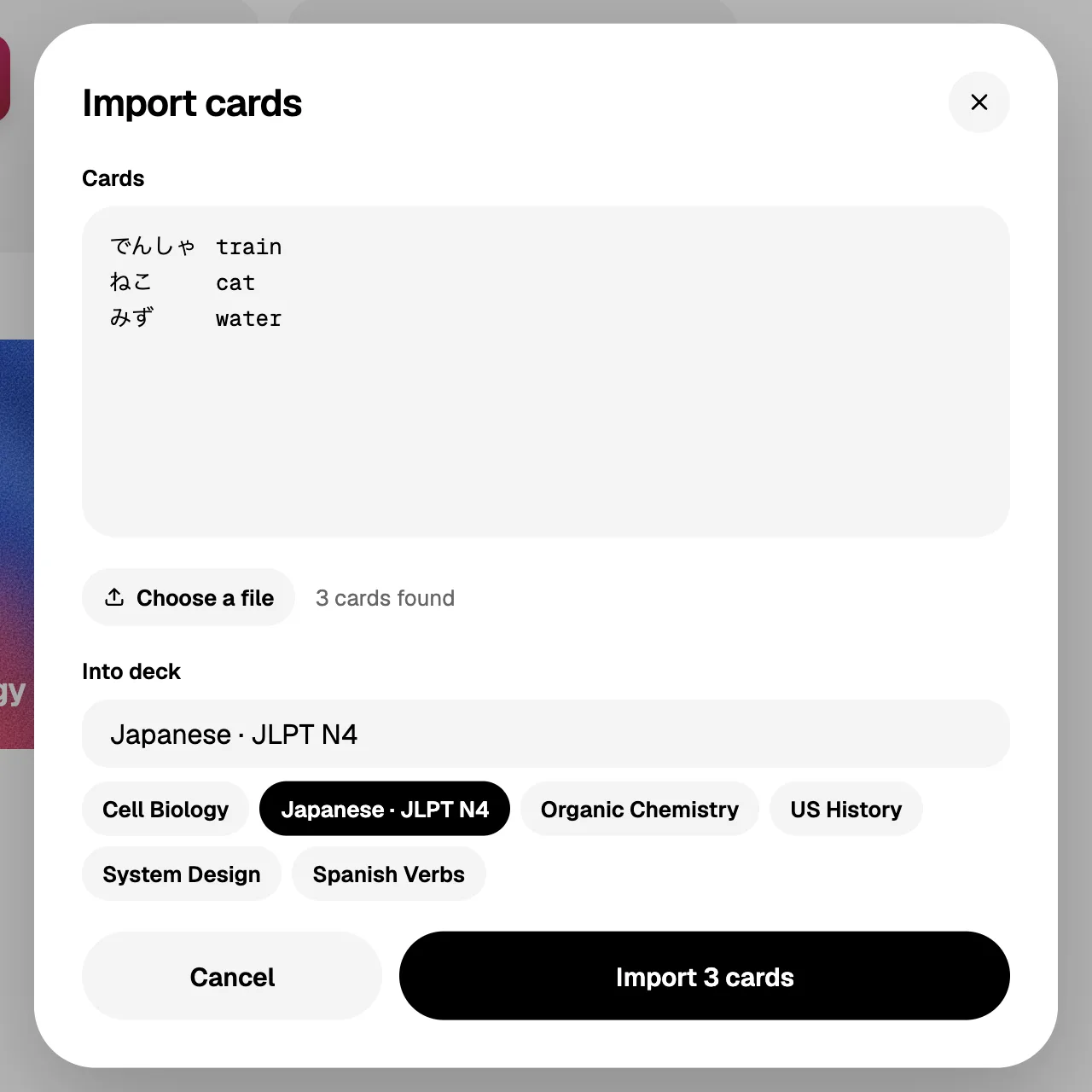
What you give up: no offline mode, no add-ons, no custom card templates, and no .apkg import. You can bring decks over through Anki’s Notes in Plain Text export, which keeps cards, bold and italics, cloze blanks and deck names but not pictures, sounds or review history.
RemNote: notes and cards together
RemNote turns any bullet in your notes into a flashcard, has desktop and mobile apps that work offline, and imports Anki .apkg files with review history. FSRS 6 is optional and in beta. Free has unlimited notes and cards with limits on PDFs, image occlusion and AI credits; Pro is $8 a month billed yearly.
Mochi: Markdown and local-first
Mochi stores your cards on your device, works offline on Mac, Windows, Linux, iPhone and Android, and imports Anki .apkg files with review history. The free plan has unlimited cards. Sync, publishing and larger AI allowances are Pro, at $5 a month billed yearly.
Knowt, Gizmo and Brainscape: a quick start
Knowt and Gizmo build AI into the app and make cards from PDFs, video and notes, with limits on the free plan. Gizmo can import an Anki deck, and Knowt takes Anki decks through a spreadsheet paste. Gizmo can’t export your cards yet.
Brainscape is simpler: rate each card 1 to 5. Its free plan is for text cards, and images, sounds and export are Pro.
Check this before you switch
- How your decks come across. RemNote and Mochi read .apkg with history. The others take text, so pictures, sounds and review history usually start over.
- Add-ons you rely on. Anki has more than 1,600. Check that the ones you use have an equivalent.
- Offline study. Lucida has none. Knowt’s is unconfirmed.
- Where your cards live. Anki keeps them on your device. Web apps keep them on a server, and you should check you can export them.
- Keep a way back. Export your Anki collection first (File, Export), so you can return.
When Anki is still the best answer
Keep Anki if you want total control of card layouts, add-ons, offline study, a free computer app, or you have a large collection. Anki’s current version is 26.09.3, and its FSRS was updated in the 26.09 release. You can also keep Anki for deep study and use another app for quick cards.
How we checked this page
Facts about these apps come from each app’s own site, help pages or app store listing, opened on September 30, 2026. Facts about Lucida come from the app, its pricing page and its privacy policy, and are as of October 1, 2026. Where we couldn’t confirm something about these apps, we left it out. If anything here is wrong, write to team@lucida.cards.
Test yourself
Show the answerShow the questionWhat does Anki’s iPhone app cost?It costs $24.99 once, while Anki on computers and Android is free.
Show the answerShow the questionWhat does Lucida give up compared with Anki?No offline mode, no add-ons, no custom card templates, and no .apkg import.
Show the answerShow the questionWhich Lucida features are free?Learn mode, live games and sharing are free. Lucida Pro costs $5.99 a month.
Show the answerShow the questionWhich apps keep your Anki review history when you switch?RemNote and Mochi. The other apps take text, so pictures, sounds and review history usually start over.
Questions
What is the best free alternative to Anki?
It depends on what you want. Lucida is free in a browser with FSRS, Learn mode and live games. Mochi’s free plan works offline with unlimited cards but no sync. RemNote’s free plan has unlimited notes and cards with limits on PDFs, image occlusion and AI. Knowt is free with limits on AI, and Brainscape is free for text cards, with images, sounds and export on Pro.
Is there an Anki alternative for iPhone that isn’t $24.99?
Yes. Mochi, RemNote, Knowt, Brainscape and Gizmo have iPhone apps with free plans, and Lucida works in Safari for free. Anki’s iPhone app, AnkiMobile, is $24.99 once, while Anki on computers and Android is free.
Is there an Anki alternative with FSRS?
Yes. RemNote offers FSRS version 6 as a beta option, Mochi lets you switch to FSRS, and Lucida plans reviews with FSRS by default. Anki itself supports FSRS too.
Is there an Anki alternative with AI?
Yes. RemNote, Mochi (Pro), Knowt, Brainscape and Gizmo build AI into the app, with monthly or daily limits on their free plans. Lucida builds in AI for making cards from your files (3 makes a day on Free), and your own AI app (Claude, ChatGPT, Cursor) can also make and edit your cards through your Lucida link.
Can I import my Anki decks into another app?
Yes, in every app here, but not equally. RemNote and Mochi import .apkg files with review history. Gizmo imports an Anki deck through Magic Import. Brainscape takes Anki’s text export. Knowt takes Anki decks through a spreadsheet paste. Lucida reads Anki’s Notes in Plain Text export.
What makes Anki hard to start with?
Its manual begins with notes, fields, note types, card templates and deck options. They make Anki very flexible, and they also take time to learn. Add-ons are optional.
Which Anki alternative works offline?
RemNote’s desktop and mobile apps and Mochi’s apps work offline, and Brainscape’s mobile apps work offline once you download your cards. Lucida has no offline mode. We couldn’t confirm offline use for Knowt.
Is Anki still worth using in 2026?
Yes, if you want control, add-ons, offline study and a free computer app. Anki’s site lists version 26.09.3, and its 26.09 release notes show a FSRS update.
Does Lucida import Anki decks?
Yes, as text. Export a deck from Anki with File, Export, Notes in Plain Text and import it in Lucida. Cards, bold and italics, cloze blanks and deck names come across. Pictures, sounds, review history and .apkg files don’t.
Keep reading
Sources (27)
The pages this one was written from, and the day each was checked.
- Anki: downloads, platforms and features · checked September 30, 2026
- AnkiMobile on the App Store · checked September 30, 2026
- Anki manual: Getting started (note types) · checked September 30, 2026
- Anki manual: Syncing with AnkiWeb · checked September 30, 2026
- Anki 26.09 release notes on GitHub · checked September 30, 2026
- Wikipedia: Anki (add-on count, used to fill a gap) · checked September 30, 2026
- RemNote pricing · checked September 30, 2026
- RemNote Help Center: Importing from Anki · checked September 30, 2026
- RemNote Help Center: The FSRS Spaced Repetition Algorithm · checked September 30, 2026
- RemNote Help Center: Offline Mode · checked September 30, 2026
- Mochi pricing · checked September 30, 2026
- Mochi docs: Importing into Mochi · checked September 30, 2026
- Mochi docs: FSRS · checked September 30, 2026
- Knowt plans and pricing · checked September 30, 2026
- Knowt Help Center: Importing from Anki and CSV files · checked September 30, 2026
- Knowt Help Center: What’s included in the free plan for students? · checked September 30, 2026
- Brainscape pricing · checked September 30, 2026
- Brainscape Help Center: Can I import my Quizlet or Anki decks? · checked September 30, 2026
- Brainscape Help Center: Do I need WiFi or a 4G/LTE connection? · checked September 30, 2026
- RemNote on the App Store (free with in-app purchases) · checked September 30, 2026
- Knowt on the App Store (free with in-app purchases) · checked September 30, 2026
- Brainscape on the App Store (free with in-app purchases) · checked September 30, 2026
- Gizmo on the App Store (free with in-app purchases) · checked September 30, 2026
- Gizmo Help: What is Magic Import? · checked September 30, 2026
- Gizmo Help: How do I edit or manage my cards? (no export yet) · checked September 30, 2026
- Lucida pricing · checked October 1, 2026
- Lucida privacy policy · checked October 1, 2026